Custom legends
The species legend auto-generates entries from the
scene’s atom styles. When this is not enough — for example, when atoms
are coloured by custom data (via colour_by), or when the legend
should distinguish polyhedra types rather than atom species — you can
build a fully custom legend from individual LegendItem
entries.
Pass a tuple of items to LegendStyle:
from hofmann import AtomLegendItem, LegendStyle

style = LegendStyle(items=(
    AtomLegendItem(key="octahedral", colour="blue", label="Octahedral"),
    AtomLegendItem(key="tetrahedral", colour="red", label="Tetrahedral"),
))
scene.render_mpl("output.svg", show_legend=True, legend_style=style)
When items is provided, the species and labels parameters
are ignored — each item carries its own key, colour, and optional
label.
Marker types
Each legend entry uses one of three marker types.
Circles
AtomLegendItem draws a filled circle — the same
marker used by the auto-generated species legend. This is the
simplest item type and a good default when no shape distinction is
needed.
Polygons
PolygonLegendItem draws a regular polygon, useful
for indicating polyhedra types. sides sets the number of edges
and rotation controls the orientation in degrees:
from hofmann import AtomLegendItem, PolygonLegendItem

items = (
    PolygonLegendItem(key="oct", colour="blue", label="Octahedral", sides=6),
    PolygonLegendItem(key="tet", colour="red", label="Tetrahedral", sides=4, rotation=45.0),
    AtomLegendItem(key="round", colour="green", label="Spherical"),
)
style = LegendStyle(items=items)
scene.render_mpl("output.svg", show_legend=True, legend_style=style)
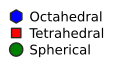
Hexagon, rotated square, and circle markers.
3D polyhedra
When a legend entry represents a polyhedron type, a flat marker is a
poor visual match for the shaded 3D shape in the scene.
PolyhedronLegendItem renders a miniature
depth-sorted, shaded icon instead:
from hofmann import PolyhedronLegendItem

items = (
    PolyhedronLegendItem(key="oct", colour="steelblue",
                         label="Octahedral", shape="octahedron", alpha=0.4),
    PolyhedronLegendItem(key="tet", colour="goldenrod",
                         label="Tetrahedral", shape="tetrahedron", alpha=0.4),
    PolyhedronLegendItem(key="cuboct", colour="mediumseagreen",
                         label="Cuboctahedral", shape="cuboctahedron", alpha=0.4),
)
style = LegendStyle(items=items)
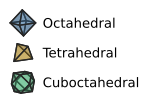
3D-shaded polyhedron legend icons.
Supported shapes are "octahedron", "tetrahedron", and
"cuboctahedron".
Polyhedron icons default to twice the flat-marker radius so that
the 3D shading is legible at typical figure sizes. Override with
radius on the item if needed.
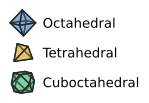
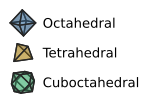
Shading. The shading uses the same Lambertian-style lighting as
the main scene. Control its strength with polyhedra_shading
(0 = flat colour, 1 = full shading):
|
|
Icon rotation. By default, polyhedron icons are drawn at a fixed
oblique viewing angle. Pass rotation to orient the icon
differently. Two forms are accepted:
(Rx, Ry)tuple — rotation angles in degrees about the x and y axes, applied asRy @ Rx.(3, 3)numpy array — a full rotation matrix used directly.
None (the default) uses the built-in oblique angle.
import numpy as np
from hofmann import PolyhedronLegendItem

# Tilt 30 degrees about x, 45 about y:
PolyhedronLegendItem(
    key="oct", colour="steelblue", shape="octahedron",
    rotation=(30.0, 45.0),
)

# Full rotation matrix (e.g. identity for a top-down view):
PolyhedronLegendItem(
    key="oct", colour="steelblue", shape="octahedron",
    rotation=np.eye(3),
)
Customising appearance
The following properties are shared across all marker types.
Sizing
Each item can set an explicit radius (in points). Items without
one fall back to the style-level circle_radius when it is a plain
float, or to the default (5.0 points) otherwise.
AtomLegendItem(key="large", colour="blue", radius=8.0)
Opacity
Set alpha (0.0–1.0) to make a marker face semi-transparent.
Marker outlines remain fully opaque, matching the visual style of
polyhedra with translucent faces and solid edges:
PolygonLegendItem(key="oct", colour="blue", label="TiO6", sides=6, alpha=0.5)
Edge styling
Each item can carry its own edge_colour and edge_width,
overriding the scene-level outline settings. When not set, the item
falls back to the scene’s outline_colour and outline_width.
Setting show_outlines=False disables edges for items that do not
define their own edge styling; explicit per-item values are still
honoured:
PolyhedronLegendItem(
    key="oct", colour="steelblue", shape="octahedron",
    edge_colour="red", edge_width=2.0,
)
Spacing and grouping
Each item can control the vertical gap below it via gap_after
(in points). Items without gap_after fall back to
LegendStyle.spacing. This is useful for visually grouping
related entries:
items = (
    AtomLegendItem(key="Sr", colour="green"),
    AtomLegendItem(key="Ti", colour="silver"),
    AtomLegendItem(key="O", colour="red", gap_after=8.0),
    PolygonLegendItem(key="oct", colour="blue", label="TiO6", sides=6),
    PolygonLegendItem(key="tet", colour="purple", label="SrO12", sides=4, rotation=45.0),
)
style = LegendStyle(items=items)
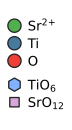
Larger gap separates the species group from the polyhedra group.
Note
Spacing between entries is based on the bounding circle of
each marker. Use gap_after to fine-tune spacing when mixing
marker types of different sizes.
Building from scene data
When building a legend to match existing polyhedra in a scene, use
from_polyhedron_spec() to inherit
colour, alpha, and edge styling from the
PolyhedronSpec:
from hofmann import PolyhedronLegendItem, PolyhedronSpec

spec = PolyhedronSpec(
    centre="Ti",
    colour=(0.5, 0.7, 1.0),
    alpha=0.3,
    edge_colour=(0.3, 0.3, 0.3),
)
item = PolyhedronLegendItem.from_polyhedron_spec(spec, "octahedron")
# item.colour, item.alpha, item.edge_colour, item.edge_width
# all inherited from spec