Colouring by per-atom data
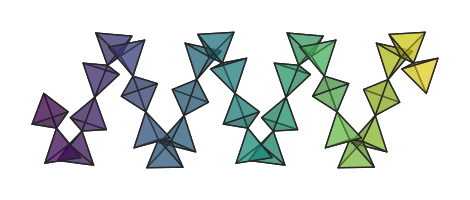
Instead of colouring atoms according to their species, atoms can be assigned per-atom data that is then used to assign specific colours.
Continuous data
A common use case is to colour atoms according to individual
numerical data. Here, each atom is assigned an angle value
corresponding to the azimuthal angle of that atom in the ring. At
render time, each atom’s angle value is mapped to a colour
using the twilight colourmap:
import numpy as np

angles = np.linspace(0, 360, len(scene.species), endpoint=False)
scene.set_atom_data("angle", angles)
scene.render_mpl("output.svg", colour_by="angle", cmap="twilight")
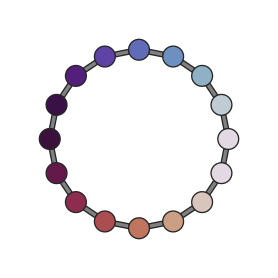
The data range is auto-scaled by default. To fix the limits (for
example, to share a colour scale across multiple figures), pass
colour_range:
scene.render_mpl("output.svg", colour_by="angle", colour_range=(0, 360))
Categorical data
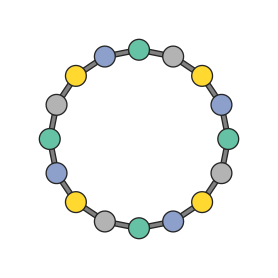
Atoms can also be assigned categorical data — site labels, coordination environments, oxidation states. Each unique value gets its own colour:
labels = ["alpha", "beta", "gamma", "delta"] * 4
scene.set_atom_data("site", labels)
scene.render_mpl("output.svg", colour_by="site", cmap="Set2")
Custom colouring functions
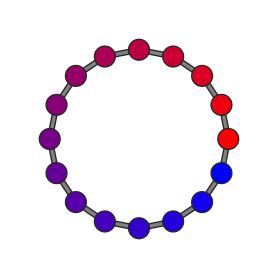
You are not limited to named colourmaps. Any callable that maps a
float in [0, 1] to an (r, g, b) tuple works — including
lambda expressions and matplotlib Colormap objects:
def red_blue(t: float) -> tuple[float, float, float]:
    """Linearly interpolate from red to blue."""
    return (1.0 - t, 0.0, t)

scene.render_mpl("output.svg", colour_by="charge", cmap=red_blue)
Colouring a subset of atoms
In the examples above, set_atom_data is called with one value
for every atom in the scene. To leave some atoms uncoloured, set
their values to NaN (for numeric data) or None (for
categorical data). These atoms will fall back to their default
species colour:
charges = np.array([1.2, np.nan, -0.8])  # atom 1 keeps its species colour
scene.set_atom_data("charge", charges)
For cases when you only have data for some atoms,
set_atom_data provides convenience arguments that allow you
to set data for a subset of atoms, without having to explicitly
specify “no data” for the other atoms in the scene.
by_species and by_index let you provide just the values
you want to set. The rest are filled with NaN or None,
as appropriate, automatically:
# Set a charge for each Mn atom (one value per Mn in the scene).
scene.set_atom_data("charge", by_species={"Mn": [2.0, 1.8, 2.1]})

# A single value is broadcast to all atoms of that species.
scene.set_atom_data("charge", by_species={"Mn": 2.0})

# Assign by atom index instead of by species.
scene.set_atom_data("charge", by_index={0: 1.2, 3: -0.8})
If by_species and by_index are both specified,
by_species values are applied first, then by_index values
are applied over the top. This is useful for setting a default
and then overriding a few atoms:
# All Mn atoms charge 2.0, except atom 3 (defect site) at 1.9.
scene.set_atom_data(
    "charge",
    by_species={"Mn": 2.0},
    by_index={3: 1.9},
)
Another pattern is where you have a full-length array but only
want to set data for a certain species.
select_by_species() can be used to
produce a copy with non-selected atoms replaced by NaN or
None, as appropriate:
filtered = scene.select_by_species(full_charge_array, "O")
# filtered has the same shape as full_charge_array, but only
# O atoms keep their values — everything else is NaN.

scene.set_atom_data("charge", filtered)
Multiple colouring layers
Different subsets of atoms can use different colouring rules in the
same render. Pass a list of keys to colour_by; each layer is
tried in order and the first non-missing value wins.
Layers can freely mix categorical and continuous data. In this example the scene has two species — “A” (outer ring) and “B” (inner ring). The outer ring is coloured by a categorical metal type, and the inner ring by a numerical charge gradient:
# Outer ring: repeating categorical labels.
scene.set_atom_data(
    "metal",
    by_species={"A": ["Fe", "Co", "Ni"] * 4},
)
# Inner ring: numerical gradient.
scene.set_atom_data("charge", by_species={"B": np.linspace(0, 1, 8)})
scene.render_mpl(
    "output.svg",
    colour_by=["metal", "charge"],
    cmap=["Set2", "YlOrRd"],
)
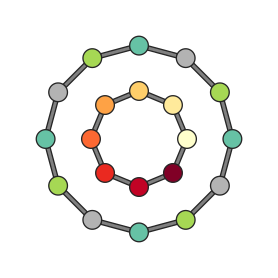
Atoms with missing data in all layers fall back to their species colour.
Polyhedra colour inheritance
When a PolyhedronSpec has no explicit colour,
polyhedra inherit the resolved colour of their centre atom. This
means colour_by colouring automatically flows through to
polyhedra without any additional configuration:
from hofmann import PolyhedronSpec

# No colour on the spec -- polyhedra inherit from colour_by.
spec = PolyhedronSpec(centre="M", alpha=0.4)

scene.set_atom_data("val", by_index={0: 0.0, 1: 0.5, 2: 1.0})
scene.render_mpl(
    "output.svg",
    colour_by="val", cmap="coolwarm",
)
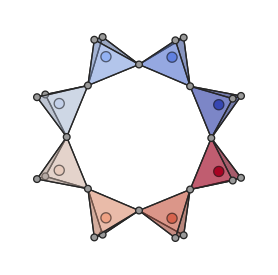
With centre and vertex atoms visible |

Atoms hidden (typical usage) |
If a PolyhedronSpec provides an explicit colour, that
colour always takes precedence over colour_by.
Per-frame colouring
Per-atom data can also vary across frames in a trajectory, so that colours update as the animation progresses. See the Animations guide for details.