Scenes and structures
A StructureScene holds all the data needed to render
a structure: atom positions, species, bonds, polyhedra, and a camera
view. The Getting started guide covers how to create a scene
from an XBS file, an ASE Atoms object, or a pymatgen Structure.
This page explains how to customise what goes into a scene.
Atoms and styles
When building a scene from an ASE Atoms object or a pymatgen
Structure, from_ase() and
from_pymatgen() generate default
AtomStyle objects for every species using
default_atom_style(). You can override individual
species by passing an atom_styles dict – only the species you
include are replaced; the rest keep their defaults:
from hofmann import AtomStyle, StructureScene

scene = StructureScene.from_pymatgen(
    structure, bonds,
    atom_styles={
        "Zr": AtomStyle(radius=1.4, colour=(0.5, 1.0, 0.5)),
        "O": AtomStyle(radius=0.8, colour="red"),
    },
    title="Custom colours",
)
This also works with styles loaded from a file (see Styles and presets):
from hofmann import load_styles

styles = load_styles("my_styles.json")
scene = StructureScene.from_pymatgen(
    structure, bonds,
    atom_styles=styles.atom_styles,
)
The following keyword arguments are accepted by
from_ase() and from_pymatgen() (and
their corresponding classmethods):
atom_styles– per-speciesAtomStyleoverrides, merged on top of auto-generated defaults.title– scene title for display.view– aViewStateto use instead of the auto-centred default.atom_data– per-atom metadata arrays for colourmap rendering (see Colouring by per-atom data).
Sites with multiple species or fractional occupancy are also
supported: pass a Composition value in place of a
species label, and the renderer draws the site as VESTA-style pie
wedges. See Partial and mixed occupancy for the full guide.
Bonds
Bonds are detected at render time from declarative
BondSpec rules. Only the species pair and maximum
length are required; min_length, radius, and colour all
have sensible defaults:
from hofmann import BondSpec

spec = BondSpec(species=("C", "H"), max_length=1.2)
You can override any default on a per-spec basis:
spec = BondSpec(species=("C", "H"), max_length=1.2,
                radius=0.15, colour="steelblue")
Species matching supports wildcards:
# Match any bond between any species:
BondSpec(species=("*", "*"), max_length=2.5)
When no bond specs are provided, from_ase() and
from_pymatgen() generate sensible defaults from VESTA
bond length cutoffs.
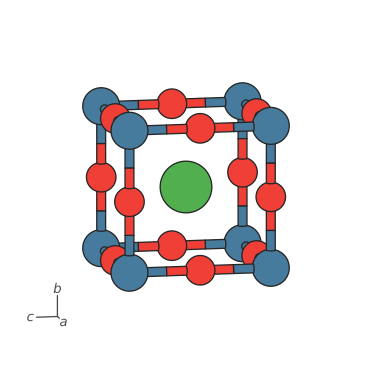
Bond display defaults
radius and colour fall back to BondSpec.default_radius
(0.1) and BondSpec.default_colour (0.5, grey) when not set
explicitly. You can change these class-level defaults to affect all
specs that have not been given an explicit value:
BondSpec.default_radius = 0.15
BondSpec.default_colour = "grey"
The repr() of a spec shows <default ...> for values that will
follow the class default, making it easy to see what has been
explicitly set and what has not.
Polyhedra
Coordination polyhedra are built from the bond graph: for each atom
whose species matches the centre pattern, a convex hull is
constructed from its bonded neighbours.
from hofmann import PolyhedronSpec

spec = PolyhedronSpec(
    centre="Ti",
    colour=(0.5, 0.7, 1.0),
    alpha=0.3,
)
scene = StructureScene.from_pymatgen(
    structure, bonds, polyhedra=[spec],
)
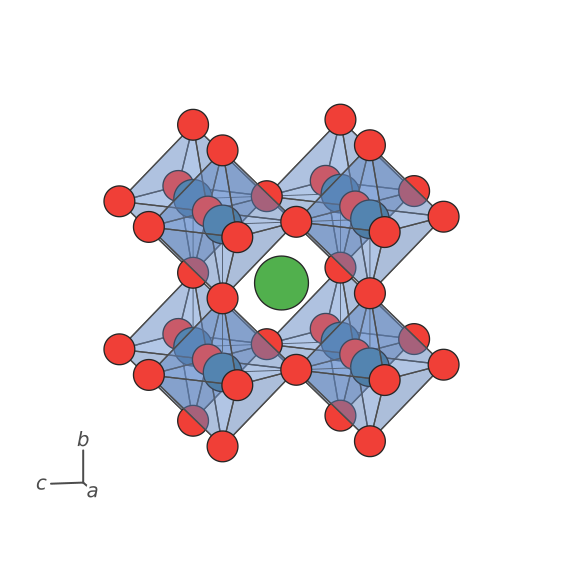
Polyhedra can also inherit per-atom colours from colour_by
data attached to their centre atoms. See Colouring by per-atom data for
details on per-atom colouring, custom colouring functions, and
polyhedra colour inheritance.
Periodic structures
When a scene has a lattice (i.e. it was created from a periodic ASE
Atoms object or a pymatgen Structure), the renderer can expand
periodic image atoms so that
bonds crossing cell boundaries are drawn correctly. PBC behaviour is
controlled at render time via RenderStyle fields:
pbc(defaultTrue) – enable or disable PBC expansion.pbc_padding(default0.1angstroms) – the Cartesian margin around the unit cell. Atoms within this distance of a cell face get an image on the opposite side. The default of 0.1 angstroms captures atoms sitting on cell boundaries without cluttering the scene. Set toNoneto disable geometric padding entirely (image atoms are still created bycompleteandrecursivebond specs).
scene = StructureScene.from_pymatgen(structure, bonds)
scene.render_mpl(pbc=True, pbc_padding=0.1)
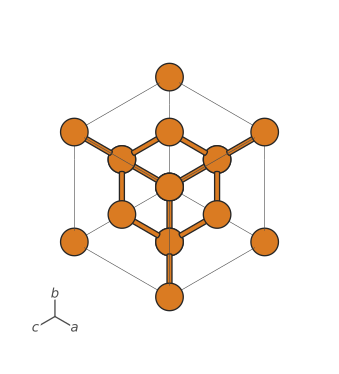
When polyhedra are defined, the PBC expansion also ensures that every atom matching a polyhedron centre pattern has its full coordination shell present, so that boundary polyhedra are complete.
Bond completion across boundaries
When atoms sit near cell boundaries, some of their bonded neighbours
may lie outside the pbc_padding margin and are not included in the
scene. Without those image atoms the bonds are missing entirely.
In the Zr-S network below (large green = Zr, small yellow = S),
some atoms have fewer bonds than expected because their partners
across the cell face are missing:
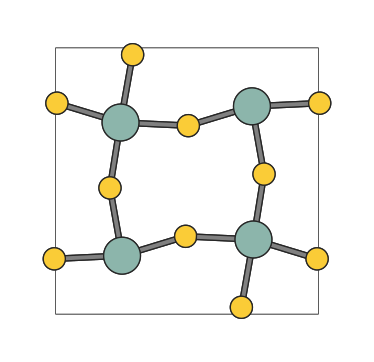
Setting complete on a bond spec tells hofmann to add the missing
neighbours. Here complete="Zr" adds missing S neighbours around
visible Zr atoms, without pulling in new Zr images around visible S:
BondSpec(species=("S", "Zr"), max_length=2.9, complete="Zr")
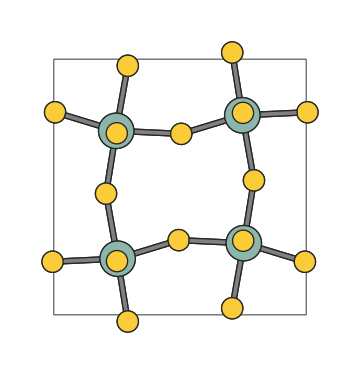
Use complete="*" to complete around both species in the pair.
Recursive bond search
Bond completion adds missing neighbours in a single pass, but does not follow chains. For molecules that span periodic boundaries the missing partners may themselves have missing partners. In the full structure below, the Zr-S bonds are complete but N2H6 molecules that cross a cell face are broken:
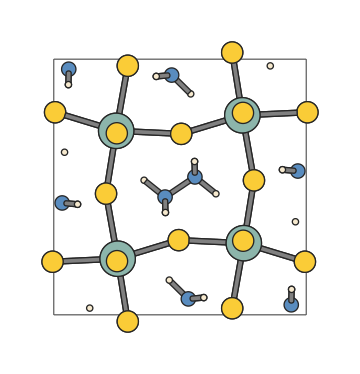
Setting recursive=True tells hofmann to iteratively search for
bonded atoms across boundaries until no new atoms are found:
bonds = [
    BondSpec(species=("S", "Zr"), max_length=2.9, complete="Zr"),
    BondSpec(species=("N", "N"), max_length=1.9, recursive=True),
    BondSpec(species=("H", "N"), max_length=1.2, recursive=True),
]
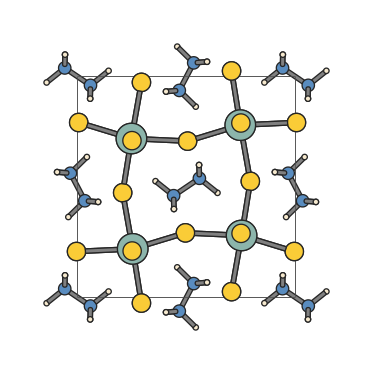
Iteration stops when no new atoms are found, or when
max_recursive_depth is reached (default 5, minimum 1).
Molecule deduplication
When molecules span cell boundaries, recursive expansion can produce duplicate fragments – the same molecule may be reconstructed starting from different periodic images. In the recursive example above, many N2H6 molecules appear more than once because they are reconstructed from multiple image atoms.
Setting deduplicate_molecules=True on the render call keeps only
the canonical image of each molecule, removing the duplicates:
scene.render_mpl(deduplicate_molecules=True)
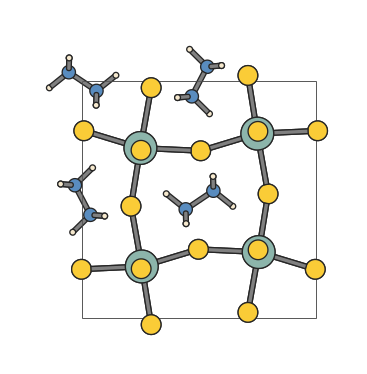
The deduplication algorithm applies several heuristics to handle mixed systems (e.g. a slab with adsorbed solvent):
Extended structure detection. A connected component that contains both a physical atom and a periodic image of the same atom is classified as an extended structure (slab, framework, or bulk crystal). These components are always preserved and excluded from deduplication.
Subset removal. Non-wrapped components whose source atoms are all already represented by an extended structure are treated as redundant image copies and removed. This handles molecules that bond to a surface: one copy is absorbed into the extended structure while standalone image copies are discarded.
Canonical selection. Among remaining duplicate molecules that share source atoms, the algorithm keeps the copy with the most atoms, breaking ties by the number of physical (non-image) atoms, then by proximity to the cell origin in fractional coordinates.
Orphan cleanup. After selection, any image atom that has no bonds within the kept set is removed. This catches isolated padding artefacts at cell edges.